


Created by real people: Every post we publish is written by our team. AI plays only a small role for adjustments and polishing. We don’t aim for generic SEO content; our focus is on delivering authentic, high-quality value for the community.
This post builds on previous App Store vs. Google Play comparison and focuses on the decisions product teams face when publishing, monetizing, and promoting a mobile app.
Monetization
The App Store generates a significantly higher average revenue per user (ARPU) than Google Play.
On iOS, subscriptions and in-app purchases for premium content perform better: monthly ARPU is around ~10.4 dollars per user, compared to ~1.4 dollars on Android (industry reports, 2026).
Google Play has a larger user base than iOS in some regions, while the opposite is true in the United States. You can check the market-share figures in our previous post.
Monetization models
According to the industry figures cited in our previous post, approximately 95% of App Store apps and 97% of Google Play apps are free to download. They then use different monetization models, including in-app purchases, subscriptions, and built-in advertising.
- App Store: Subscriptions and in-app purchases (IAP) for premium content or advanced features work exceptionally well.
- Google Play: Freemium models with built-in advertising and in-app purchases for virtual goods or low-cost unlocks are more effective.
Platform fees
For a small team, it is worth enrolling in Apple's Small Business Program as early as possible because the reduced rate is not retroactive. On Google Play, teams should check which fee structure applies in their markets and whether they meet the eligibility requirements for the Level Up or Apps Experience programs.
Apple:
- Standard rate outside the EU: 30% on paid apps and in-app purchases, subject to the exceptions below.
- European Union: Since October 1, 2026, the commission on sales processed through Apple In-App Purchase is 26%, or 15% for participants in eligible programs and for auto-renewable subscriptions after their first year.
- Small Business Program: 15% for eligible developers whose combined proceeds, including Associated Developer Accounts, did not exceed $1 million in the previous calendar year. If combined proceeds exceed $1 million during the current year, the standard rate applies to future sales.
- Auto-renewable subscriptions: Outside the Small Business Program, the commission drops to 15% after a subscriber accumulates one year of paid service within the subscription group. Free trials and complimentary periods do not count toward that year.
Google Play (new fee structure):
For transactions with users in Australia, the EEA, Japan, the UK and the US, Google Play applies separate service and billing fees. The rollout began on June 30, 2026 in the EEA, the UK and the US, and on September 30, 2026 in Australia and Japan.
- First $1 million in annual earnings for enrolled developers: 10% service fee.
- Auto-renewing subscriptions: 10%.
- Other transactions: 20% from new installs and 25% from existing installs.
- Level Up and Apps Experience programs: 15% from new installs and 20% from existing installs. Enrollment currently requires at least $1 million in group earnings during the previous 12 months.
An additional 5% billing fee applies only when Google Play Billing is used for an in-app digital purchase or for the initial purchase of a paid app or game.
Other markets retain the previous structure for now: 15% on the first $1 million for enrolled developers, 30% above that amount, and 15% on auto-renewing subscriptions.
Publishing process
For a team deciding where to launch an MVP first, Google Play can offer faster iteration once the account has production access. Apple applies App Review to every submitted app version.
Registration cost
- Google Play: a one-time payment of $25 for the developer account.
- App Store: an annual fee of $99.
Review times:
First release:
- Apple: the first submission goes through the same App Review as any update. Apple reports that at least 50% of submissions are reviewed in under 24 hours and 90% in under 48 hours, though a rejection and resubmission adds another cycle.
- Google Play: personal developer accounts created after November 13, 2023, must first run a closed test with at least 12 testers, opted in continuously for at least 14 days, before applying for production access. Google also notes that app review for certain accounts, such as new developer accounts, can take up to seven days or longer in exceptional cases.
Updates:
- Apple: every update goes through App Review again, with the same timings as above.
- Google Play: most apps get approved within hours. Review is automated by default and only escalates to manual review if the system flags a possible policy violation.
Rejection data
- Apple reviewed 9,100,620 submissions in 2025 and rejected 2,093,244, equivalent to approximately 23%. This is a submission-level ratio, not a unique-app rejection rate, because an app may be submitted multiple times. It’s stricter on UI/UX, performance, and privacy.
- Google’s rate is around 10 to 20%, though in 2026 it started getting stricter on battery consumption and malware.
ASO / Discoverability
ASO (App Store Optimization) covers the metadata and visual assets that help an app appear in store search results and convert page visits into installs. Apple and Google Play index different fields, so the same approach does not apply equally to both.
Apple:
Apple indexes the app name (30 characters), the subtitle (30 characters), a hidden 100-character keyword field, and the primary category. The description isn’t indexed for ranking. Repeating keywords across those fields doesn’t add value.
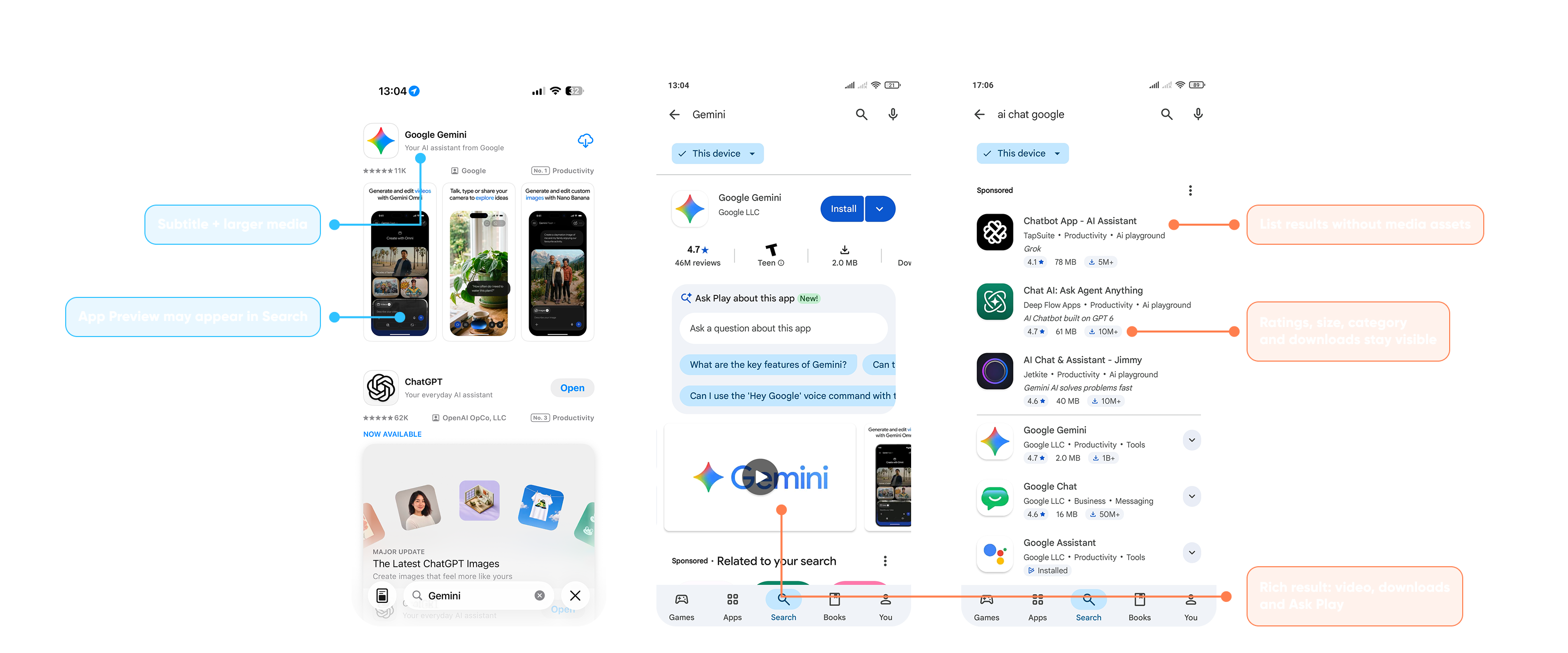
In search results, Apple shows each app with its ratings, developer, and category, followed by a visual block that can display up to the first three screenshots. For users who already have the app, an in-app event card, a banner-style tile with a badge, may appear instead of the screenshots.
Google Play:
Google Play indexes the title (30 characters), the short description (80 characters), and the full description (up to 4,000 characters).
In the current Google Play experience, we observed two search-result layouts:
- Close app-name match. When a query points clearly to a specific app, Google Play may elevate it in a rich, app-focused result. This layout can surface the install button, ratings, download count, Ask Play, screenshots and a preview video directly within Search.
- Broader or ambiguous query. When the search does not resolve confidently to one app, Google Play may display a conventional list of results. Users can compare app names, icons, ratings, file sizes and download counts, but screenshots and videos are not shown before opening an individual listing.
In short, on Google Play the icon and title appear in both observed result types. The short description is not shown in every search result, while screenshots and video can appear when the query resolves to a richer, app-focused result.
On Apple, keyword placement matters because the indexed fields are short and separate. On Google Play, the title and descriptions provide more space for relevant, natural language.
Visibility opportunities
- App Store: Apps can gain additional visibility through the Today tab, editorial collections, featuring and Custom Product Pages.
- Google Play: Search ranking considers query relevance, store-listing metadata, app quality, user behavior and other signals.
Visual differences between App Store and Google Play product pages
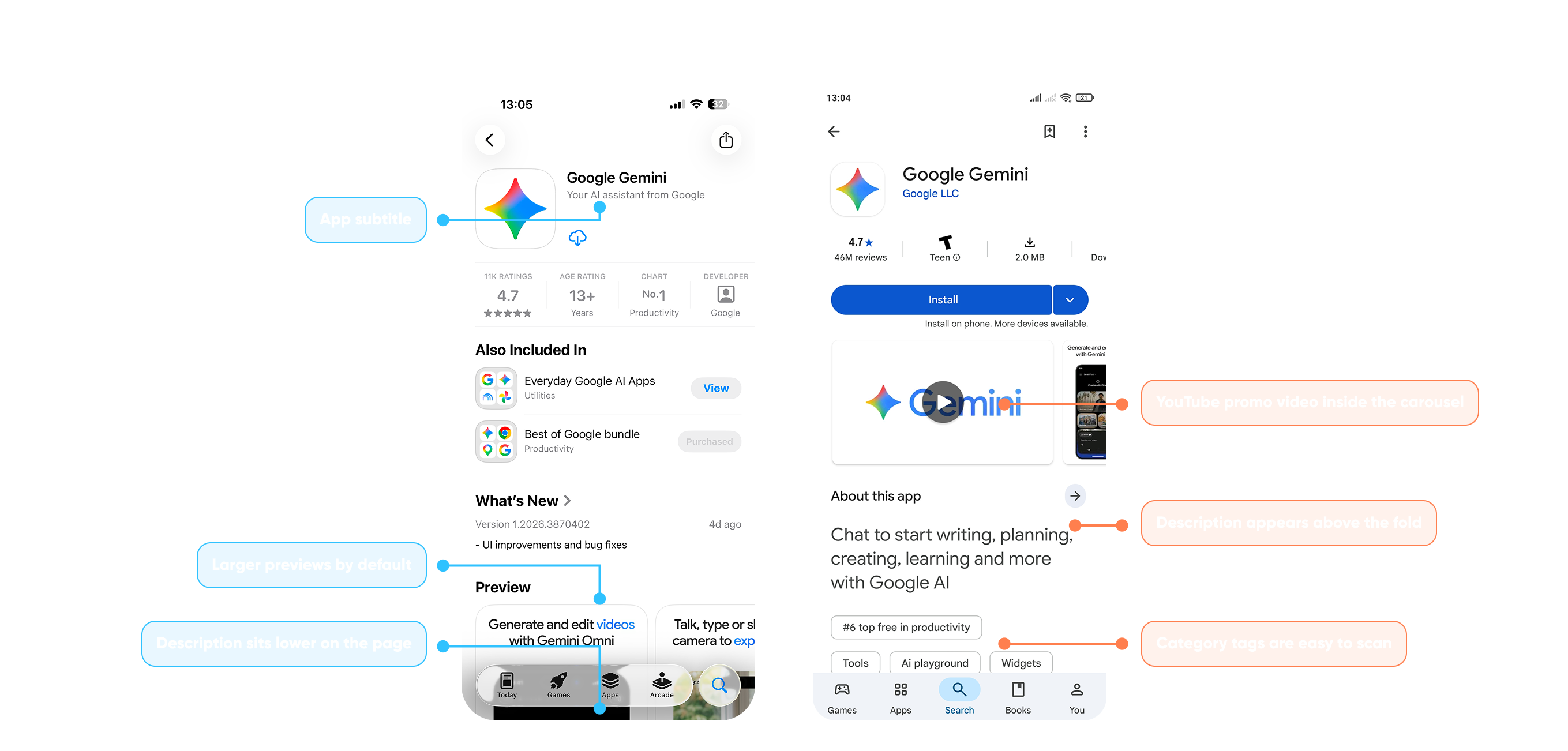
App Store and Google Play organize their product pages differently. The example below shows which elements appear before the full description on each store. Layouts may vary by device, storefront, account and app configuration.
Apple:
The top of the page is about identity and trust. The name sits next to the icon with the subtitle right below it, followed by a single strip of social proof: number of ratings, age rating, developer and, when the app is ranked, chart position.
Screenshots and previews are large by default, but in the example above they sit lower on the page, after sections like "Also Included In" (bundles) and "What's New". The description sits even lower. In practice, the subtitle, the rating strip and the screenshots do most of the work before anyone reads the description.
Google Play:
Google Play places the title, developer name, key metrics and Install button near the top of the page. Under the title you see the developer name, then a swipeable row with rating and review count, age rating, download size and downloads. The Install button is wide and prominent, with a menu to choose which device to install on when the user has compatible devices linked to the same Google Account.
Right below, the media carousel opens with the preview video, if one has been added to the store listing, followed by the screenshots. In this example, the "About this app" section shows the short description above the fold, and a chart ranking chip plus category tags at the bottom help users browse related apps when available.
Visual assets: icon, screenshots and video on each store
Both stores use several visual assets beyond screenshots. The icon, the video and, on Google Play, a feature graphic all shape how an app looks in search and on its page.
Apple:
For the icon, Apple's Icon Composer (it requires macOS Tahoe 26.4 or later) lets you build layered icons with the Liquid Glass material and export them to Xcode. From a single design you get the default, dark and mono appearances.
You can upload up to 10 screenshots per device size, as JPEG or PNG without transparency. If your UI is consistent, upload the highest required resolution and App Store Connect scales it down for smaller device sizes. As of October 2026, the required portrait sizes are:
- iPhone with Dynamic Island (medium display): 1179x2556 or 1206x2622 px.
- 13-inch iPad: 2064x2752 or 2048x2732 px.
Apple also lists 1398 × 2034 px for the iPhone Duo outer display and 2007 × 2853 px for the inner display. These screenshots become required in April 2027 for apps using the iOS 27.1 SDK or later.
App previews for iPhone also come in portrait at 886x1920 px: up to 3 per supported device size and language, 15 to 30 seconds each. They appear before screenshots on iPhone, iPad, Mac and Apple TV. If a preview uses a different aspect ratio from the screenshots, it appears instead in the “A Closer Look” section.
Google Play:
Google Play asks for more branded assets. The icon is a 512x512 px 32-bit PNG of up to 1024 KB, and the feature graphic (1024x500 px, JPEG or 24-bit PNG) is required to publish your listing.
You must provide at least 2 screenshots in total across device types and can upload up to 8 per supported device type, as JPEG or 24-bit PNG without alpha. Each side must be between 320 and 3840 px, and the long side can't exceed twice the short side. For eligibility in recommendation formats that use screenshots, provide at least 4 screenshots at a minimum of 1080 px, using 1920x1080 for landscape or 1080x1920 for portrait.
A listing can include one preview video, provided as a YouTube URL with ads disabled. When displayed alongside screenshots, the video appears first. As covered above, whether previews show up in search depends on the user's query.
Ads for store visibility (paid acquisition)
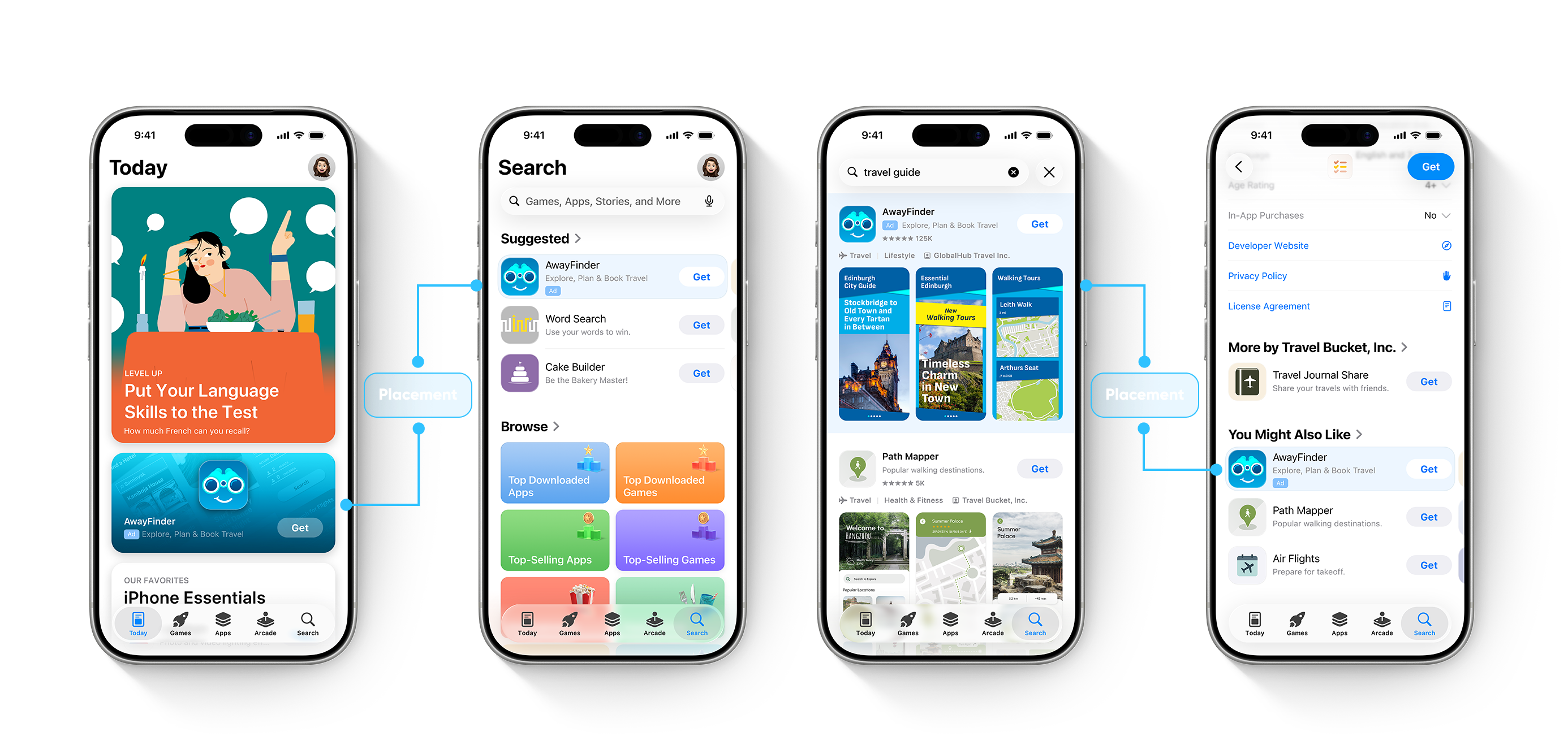
Apple:
Apple offers a one-time $100 promotional credit to eligible new Apple Ads accounts after they are linked to App Store Connect. Apple provides two solutions: Basic, with automated CPI pricing and no keyword or audience settings, and Advanced, with multiple placements, optional keyword control, multiple ad groups, and detailed reporting.
Apple Ads Advanced uses Cost-Per-Tap (CPT) pricing: you pay when someone taps the ad. Manage Bids campaigns let you set a maximum CPT, while Maximize Conversions search campaigns use an auto-bidder based on your target CPA. Apple Ads Advanced campaigns can appear in four places: the Today tab, the Search tab, search results, and across other apps’ product pages.
Apple Ads Basic uses Cost-Per-Install (CPI) pricing: you pay for installs up to the maximum CPI you set. Apple Ads Basic runs only in App Store search results.
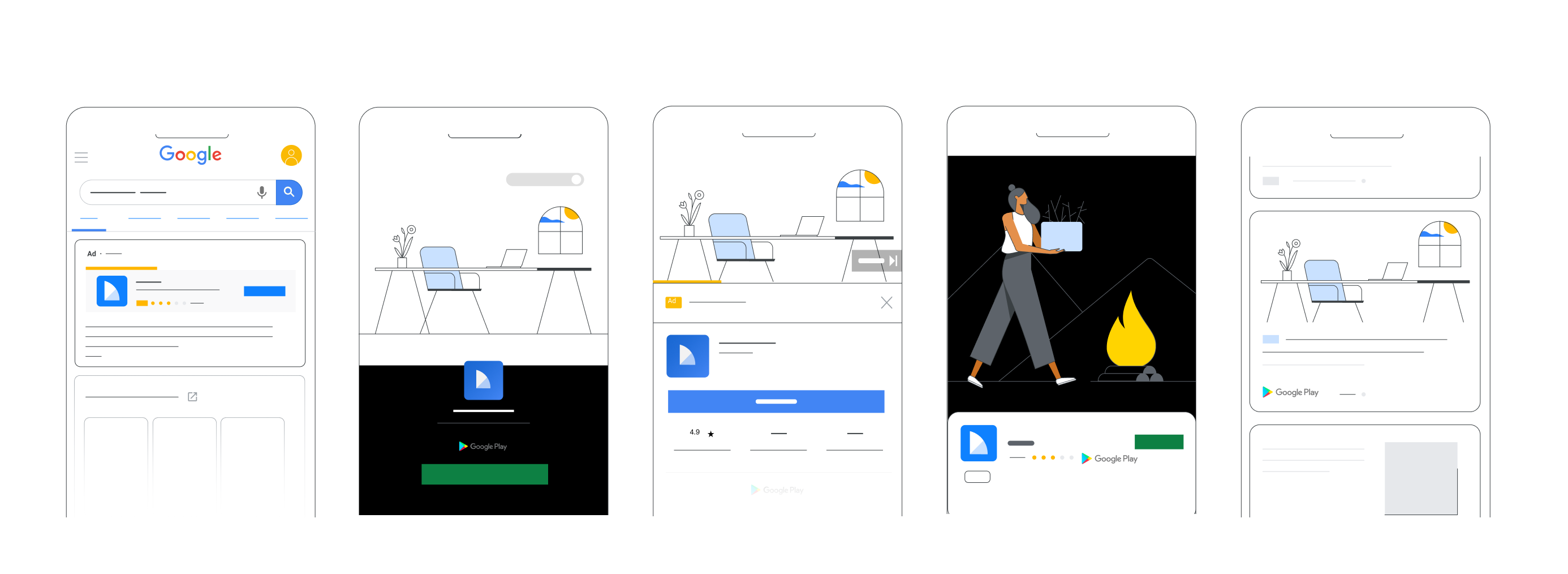
Google Play:
Google App campaigns work differently: you don’t select keywords. Instead, you provide creative assets, select a campaign goal and set a budget, plus a target when the chosen bidding strategy requires one. Google then tests asset combinations automatically. Ads can run across Google Search, Google Play, YouTube, the Google Display Network, and Discover: a single campaign can serve across all of those surfaces.
For a team with a small marketing budget, Apple Ads Basic offers predictable cost-per-install pricing and lets you set a monthly budget. Google recommends a daily budget of at least 50 times the target CPI for App campaigns optimized for install volume, so these campaigns may require more initial spend to collect enough conversion data.
Quick comparison
FAQs
How much commission does the App Store charge vs Google Play?
Outside the EU, Apple charges 30% standard, or 15% through the Small Business Program and on subscriptions after one year of paid service. In the EU, the rate is 26%, or 15% for eligible programs and qualifying subscriptions. In Google Play’s new regional structure for Australia, the EEA, Japan, the UK and the US, subscriptions and the first $1 million for enrolled developers are charged 10%; other transactions are 20% from new installs or 25% from existing installs. The additional 5% applies only when Google Play Billing is used or for the initial purchase of a paid app or game. Other markets retain the previous fee structure for now.
How long does it take to get an app approved on Google Play and the App Store?
Apple reports that at least 50% of submissions are reviewed in under 24 hours and 90% in under 48 hours. On Google Play, personal accounts created after November 13, 2023, need a closed test with at least 12 testers for 14 continuous days before applying for production access. Reviews can take from a few hours to seven days, or longer in exceptional cases.
How much does it cost to publish an app on each store?
Google Play charges a one-time payment of $25 for the developer account. Apple charges an annual fee of $99, whether or not you publish an app that year.
How does ASO (App Store Optimization) work on each platform?
Apple indexes the name, subtitle, hidden keyword field, and primary category; the description doesn’t count toward ranking. Google Play indexes the title, short description, and full description. Its metadata should be relevant and naturally written, without repetitive keywords or a fixed keyword-density target.
What size should App Store and Google Play screenshots be?
On the App Store, the required iPhone portrait sizes are 1179x2556 or 1206x2622 px. A 13-inch iPad requires 2064x2752 or 2048x2732 px. Apple lists 1398x2034 and 2007x2853 px for the iPhone Duo, which become required in April 2027 for apps using the iOS 27.1 SDK or later.
On Google Play, you need at least 2 screenshots in total and can upload up to 8 per device type. Each side must be between 320 and 3840 px, with a maximum 2:1 ratio. The 16:9 and 9:16 formats are required only for eligibility in certain recommendation formats.
What’s the difference between Apple Ads and Google App Campaigns?
Apple Ads Basic uses Cost-Per-Install pricing and runs only in search results. Advanced uses Cost-Per-Tap pricing, supports four App Store placements, and offers optional keyword-level control. Google App Campaigns automate targeting and can serve across Search, Google Play, YouTube, Discover, and the Google Display Network.
Is it better to launch first on iOS or Android?
It depends on the business model. If the plan is subscriptions or premium purchases, iOS tends to perform better per user. If the model is freemium with volume or advertising, Android offers greater scale. Google Play can offer faster iteration once the developer account has production access.
How does App Tracking Transparency (ATT) affect in-app advertising revenue?
ATT requires permission before tracking users across other companies’ apps and websites or accessing the advertising identifier. Without permission, targeting and attribution data are more limited, although privacy-preserving attribution remains available. The effect on CPM and revenue varies by audience, consent rate, ad network, and format, so it isn’t universally lower than on Android.
Thank you for reading
Stay tuned and subscribe to Mobile Dev Experiences to be part of this growing community where we share strategies, insights, and real-world lessons in cross-platform mobile development.
Sources and references
Official documentation last checked on October 12, 2026.
Apple
- Developer account and fees: Apple Developer Program membership, App Store Small Business Program, auto-renewable subscriptions and changes for apps in the European Union.
- App Review: review status and estimated review times and App Store Transparency Report.
- App Store metadata and discovery: app information specifications, App Store search and custom product pages.
- Visual assets: screenshot specifications, app preview specifications and Icon Composer.
- Apple Ads: Apple Ads Basic, comparison of Basic and Advanced and promotional credit eligibility.
- Privacy and tracking: User Privacy and Data Use and App Tracking Transparency.
- App Store ecosystem: Developing for the App Store.
- Developer account and testing: Play Console registration, testing requirements for new personal accounts and publishing an app.
- Review and updates: reviewing and publishing app changes and Play Console policy status.
- Service fees: Google Play service fees.
- Store listing and ASO: creating and setting up a store listing, Google Play search discovery and metadata policies.
- Visual assets: Google Play graphic asset requirements.
- Paid acquisition: Google Ads App campaigns, campaign goals and recommended budgets and App campaign bid strategies.
Previous Horus article