


Created by real people: Every post we publish is written by our team. AI plays only a small role for adjustments and polishing. We don’t aim for generic SEO content; our focus is on delivering authentic, high-quality value for the community.
.NET MAUI changes its engine: what it means for your mobile app
If you have a mobile app built with .NET MAUI (or you're thinking about migrating from Xamarin), there's a recent technical announcement that's worth understanding, even if you're not a developer.
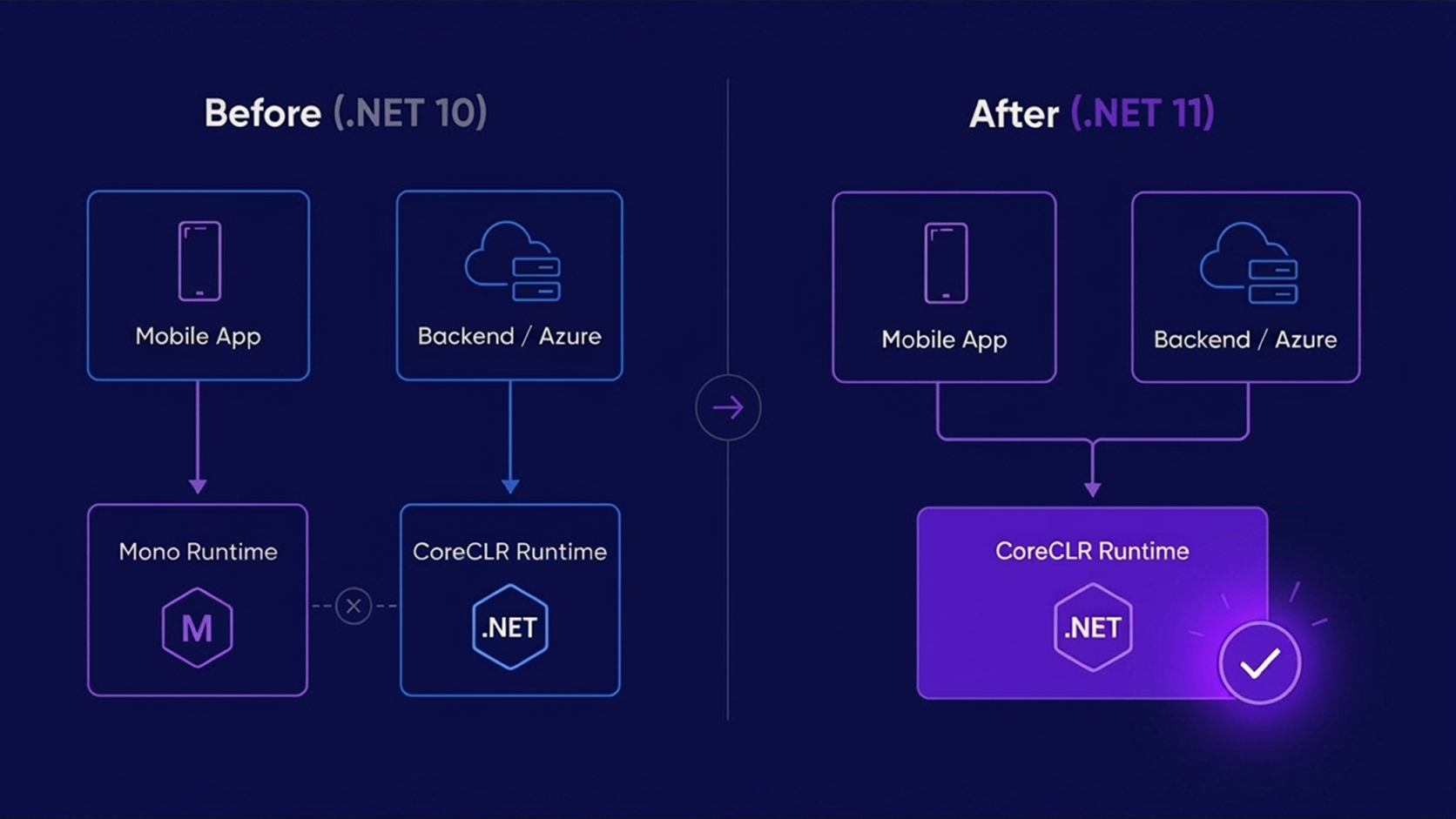
Microsoft announced that .NET MAUI is moving to CoreCLR starting with .NET 11. CoreCLR is the main .NET runtime, the same one powering backends on Azure, cloud services, and pretty much everything in the modern .NET ecosystem. (Note: Blazor WebAssembly is not affected by this change; it stays on Mono.)
Until now, your mobile app ran on a runtime called Mono (originally built by the Xamarin team before Microsoft acquired them in 2016) while your backend ran on CoreCLR. Two different engines for almost 10 years, with their own rules, their own diagnostic tools, their own quirks when things broke.
That changes with .NET 11. And it has real implications for any team maintaining or building .NET apps.
What actually changes?
One stack, end to end
Before, when something broke in the mobile app, you'd diagnose it with completely different tools than the ones you used for the backend. That meant more time finding the root cause, and often two different specialists looking at the same problem from different angles.
(Note: Android SDK and Xcode are still required to build and deploy on each platform; that doesn't change. What changes is that you no longer need to learn each platform's separate diagnostic tooling.)
Better startup performance, out of the box
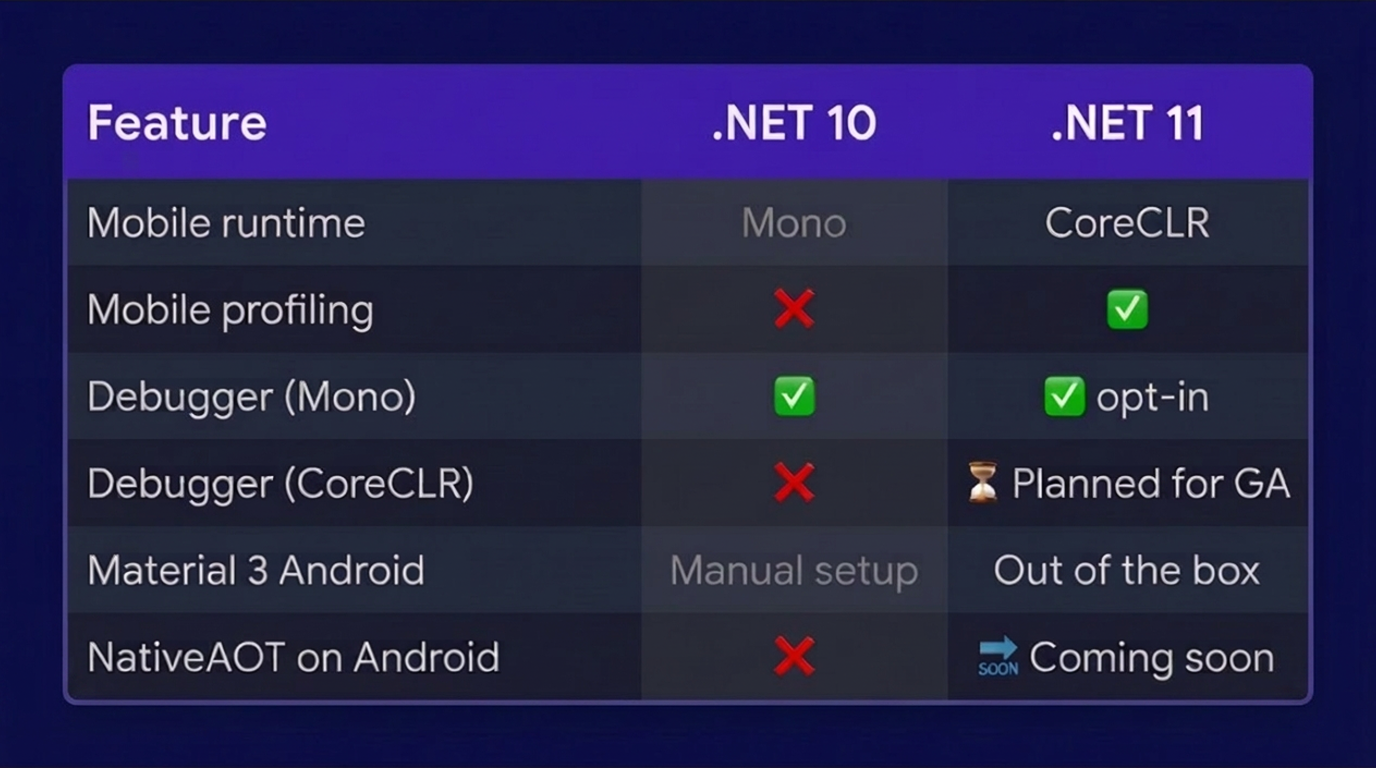
CoreCLR includes compilation optimizations that Mono didn't have. For new and medium-sized apps, startup time improves measurably without the team having to do anything. The optimizations come built in.
Hot reload on mobile from the terminal
NativeAOT on Android: the natural next step
CoreCLR is the foundation needed for NativeAOT, fully ahead-of-time compilation that produces faster, smaller native binaries. With CoreCLR as the default runtime, the path to NativeAOT on Android opens up as a natural evolution in future releases. On iOS and Mac Catalyst, NativeAOT was already required by Apple; now the entire stack moves to a unified toolchain.
Before you migrate: three things to know
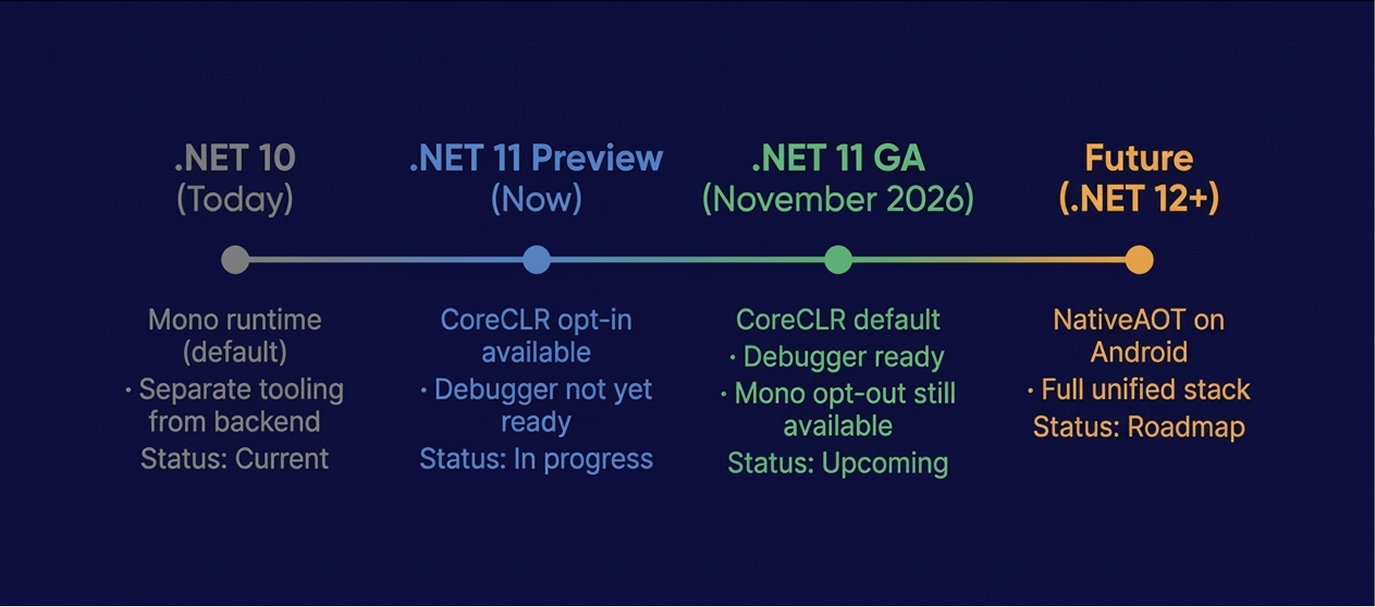
Here's the transition map, so you know what's available now and what's coming in November:
The debugger isn't ready yet
CoreCLR on mobile is new, and the debugger for that combination (the one that lets you pause the app, inspect variables, and step through code in Visual Studio) isn't available yet. Until it is, teams that need active debugging have to temporarily switch back to the previous runtime with a single line of config.
For production teams this isn't a blocker: apps run perfectly fine. But for the dev team working on new features, it's something to plan for. Microsoft expects to have this resolved for the official November release, and the Mono opt-out will remain available throughout the entire .NET 11 servicing cycle.
If your app is large and complex on Android, measure before you assume improvement
For simple and medium apps, CoreCLR starts faster. For apps with lots of dependencies, complex logic, or legacy code, there are reported cases where startup time increases or the APK size grows. It's not everyone's problem, but it's not something to ignore either.
The recommendation from the Microsoft team is clear: build your app in Release mode, measure startup on a real physical device, and compare it against your .NET 10 baseline before making decisions. Don't assume it's going to improve until you verify it.
If your app supports Android 6 or lower, or uses x86 architecture, there's a change you need to evaluate
Microsoft decided not to include support for Android API 23 (Android 6.0) and below, or Android x86, in .NET 11. This isn't a technical limitation of CoreCLR: it's a support decision. Those architectures are rarely used and Microsoft chose not to carry them into the new runtime. If your user base includes those devices (more common in emerging markets or long-running apps), that segment won't work with CoreCLR by default. Staying on Mono is still an option for those cases, but it's a decision to make before migrating, not after.
What does this mean for you?
If your app is already on .NET MAUI, this change comes with .NET 11 in November. You don't need to do anything today, but it's worth having your team start testing it in Preview so you arrive at the official release without surprises.
If you're still on Xamarin, this is one more reason to get the migration on your roadmap. Xamarin reached end-of-life in 2024 and won't receive this or any future improvements. The gap between what a MAUI app can do and what a Xamarin app can do is going to keep growing.
For the first time in a generation, the .NET mobile ecosystem runs on the same foundation as everything else. It's not the end of a story: it's the beginning of a simpler one.
If you want the full technical breakdown, David Ortinau, Principal Product Manager of the .NET MAUI team at Microsoft, wrote the official post with the full history and transition details: read it here.
Thank you for reading
Stay tuned and subscribe to Mobile Dev Experiences to be part of this growing community where we share strategies, insights, and real-world lessons in cross-platform mobile development.